ZUGFeRD export: common modifications

ZUGFeRD export: common modifications

Reflect header charges (markups)

The standard sales invoice in D365 only shows the total of all miscellaneous charges (markups), but not the single markup transactions. No information about header charges is disclosed – unless we are in Finland: the Finnish localisation ensures disclosure of detailed charges on invoices, which is why the invoice data provider collects markup details only when the ISO country code is “FI”. For all other countries, this logic is skipped in standard D365.

Data for the ZUGFeRD e-invoice is calculated in D365 by the same Data Provider as with the original SSRS sales invoice: SalesInvoiceDP. Without extending the DP or introducing alternative data sources, Electronic Reporting alone cannot retrieve missing charge details. The challenge and a possible no-code solution is best described in the article “ER: Add charge details to the Sales invoice report – CleverAX” written by a fellow ER expert.

An alternative is a small X++ customisation:

				
					[ExtensionOf(classStr(SalesInvoiceDPBase))]
final class SalesInvoiceDPBase_Extension
{
    #ISOCountryRegionCodes
    public void createData()
    {
        next createData();
        if (isoCountryCode != #isoFI)
        {
            this.insertMarkupSpec(custInvoiceJour);
        }
    }
}


This extension effectively enables header charge extraction for all countries; in the Lasernet application, this behaviour is activated by the feature “SalesInvoice.Report creates temporary MarkupTmpTrans_FI“. In the Docentric ecosystem, you need the above customisation plus another one.    

If no detailed charge records are available in the data model, our e-invoice falls back to displaying the total:

      <ram:SpecifiedTradeAllowanceCharge>
        <ram:ChargeIndicator>
          <udt:Indicator>true</udt:Indicator>
        </ram:ChargeIndicator>
        <ram:ActualAmount>123.99</ram:ActualAmount>
        <ram:Reason>Summe der Zuschläge</ram:Reason>
        <ram:CategoryTradeTax>
          <ram:TypeCode>VAT</ram:TypeCode>
          <ram:CategoryCode>S</ram:CategoryCode>
          <ram:RateApplicablePercent>19</ram:RateApplicablePercent>
        </ram:CategoryTradeTax>
      </ram:SpecifiedTradeAllowanceCharge>

With the above customisation in place, the XML output expands to include individual charge entries:

      <ram:SpecifiedTradeAllowanceCharge>
        <ram:ChargeIndicator>
          <udt:Indicator>true</udt:Indicator>
        </ram:ChargeIndicator>
        <ram:ActualAmount>99.99</ram:ActualAmount>
        <ram:Reason>FREIGHT</ram:Reason>
        <ram:CategoryTradeTax>
          <ram:TypeCode>VAT</ram:TypeCode>
          <ram:CategoryCode>S</ram:CategoryCode>
          <ram:RateApplicablePercent>19</ram:RateApplicablePercent>
        </ram:CategoryTradeTax>
      </ram:SpecifiedTradeAllowanceCharge>
      <ram:SpecifiedTradeAllowanceCharge>
        <ram:ChargeIndicator>
          <udt:Indicator>true</udt:Indicator>
        </ram:ChargeIndicator>
        <ram:ActualAmount>24.0</ram:ActualAmount>
        <ram:Reason>HANDLING</ram:Reason>
        <ram:CategoryTradeTax>
          <ram:TypeCode>VAT</ram:TypeCode>
          <ram:CategoryCode>S</ram:CategoryCode>
          <ram:RateApplicablePercent>19</ram:RateApplicablePercent>
        </ram:CategoryTradeTax>
      </ram:SpecifiedTradeAllowanceCharge>

Reflect line charges

The above customisation to Dynamics 365 for Finance only solves header-level charges. Even in Finland, the SalesInvoiceTmp record representing the surcharge does not have a reference to the invoice line: the line-level charges are never disclosed in standard D365.

Fortunately, the Retail Call Center (“MCR”) configuration key (it is usually active) helps: the related MCRMarkupCalculatedAmount field keeps the total of all line charges which affect the invoice amount. This data source is leveraged in our ZUGFeRD configuration to reflect the sum of all charges per line:

      <ram:SpecifiedTradeAllowanceCharge>
        <ram:ChargeIndicator>
          <udt:Indicator>true</udt:Indicator>
        </ram:ChargeIndicator>
        <ram:ActualAmount>12.3</ram:ActualAmount>
        <ram:Reason>Belastung</ram:Reason>
      </ram:SpecifiedTradeAllowanceCharge>

If a detailed list of line-level charges broken down by code/description is required, then you need an adaptation of the ZUGFeRD ER report and mapping. Refer to the the Docentric’s article “Add Charges to Sales Invoice Lines through ER” first.

If you do not have the Docentric code installed, the following X++ snippet must be deployed, plus an extension of the SalesInvoiceTmp table with the field JourTransRecId_DR, contact us for more details:

				
					[ExtensionOf(classStr(SalesInvoiceDP))]
final class SalesInvoiceDP_Extension
{
    protected void populateSalesInvoiceTmp(CustInvoiceJour _custInvoiceJour, CustInvoiceTrans _custInvoiceTrans, TaxSpec _taxSpec,
        CustPaymSchedLine _custPaymSchedLine, CustTrans _prepaymentCustTrans, TaxTrans _prepaymentTaxTrans)
    {
        next populateSalesInvoiceTmp(_custInvoiceJour,
            _custInvoiceTrans,
            _taxSpec,
            _custPaymSchedLine,
            _prepaymentCustTrans,
            _prepaymentTaxTrans);

        salesInvoiceTmp.JourTransRecId_DR = _custInvoiceTrans.RecId;
    }
}


Derive a custom mapping from the “Invoice model mapping (ZUGFeRD)“, and derive a custom format from the “ZUGFeRD Sales invoice“.

As suggested by Sanja Kolundzija, add

$SalesInvoiceTmp_Lines.$CustInvoiceTransFromTableDef asTables.CustInvoiceTransTable.'findRecId()'(@.JourTransRecId_DR),

to the derived Mapping, then add a nested record list

$CustInvoiceTransFromTableDef.$MarkupTransWithFilter as

FILTER(Tables.MarkupTransRecords,
AND(Tables.MarkupTransRecords.TransTableId=TABLENAME2ID("CustInvoiceTrans"),
Tables.MarkupTransRecords.TransRecId=@.RecId))

The InvoiceLines.MarkupTransaction list in not bound in the Microsoft’s base mapping, you have to bind it as shown:
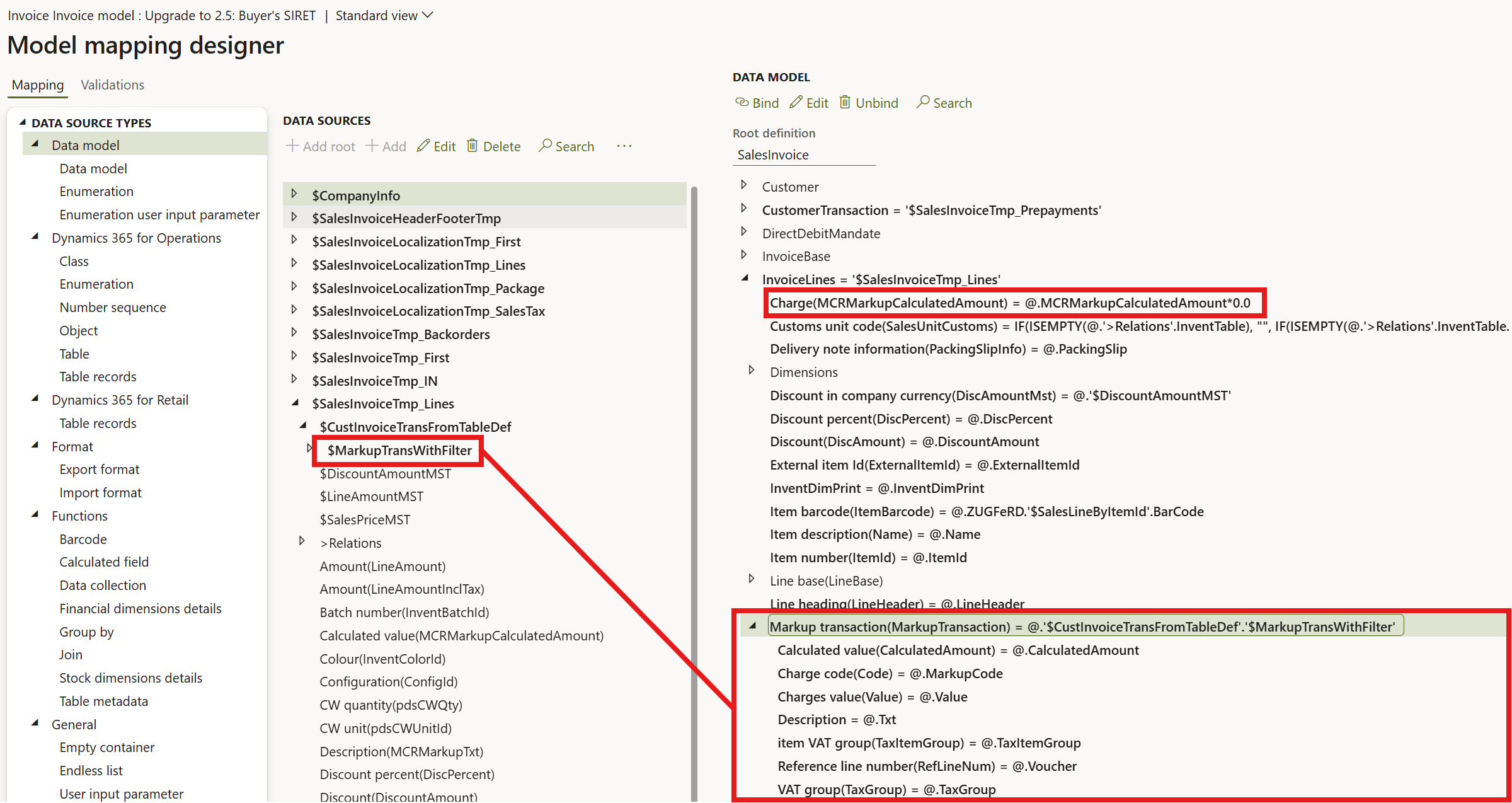
Additionally, you have to set the MCRMarkupCalculatedAmount element to zero to avoid doubling of line charge amounts: Charge(InvoiceLines.MCRMarkupCalculatedAmount) = @.MCRMarkupCalculatedAmount*0.0

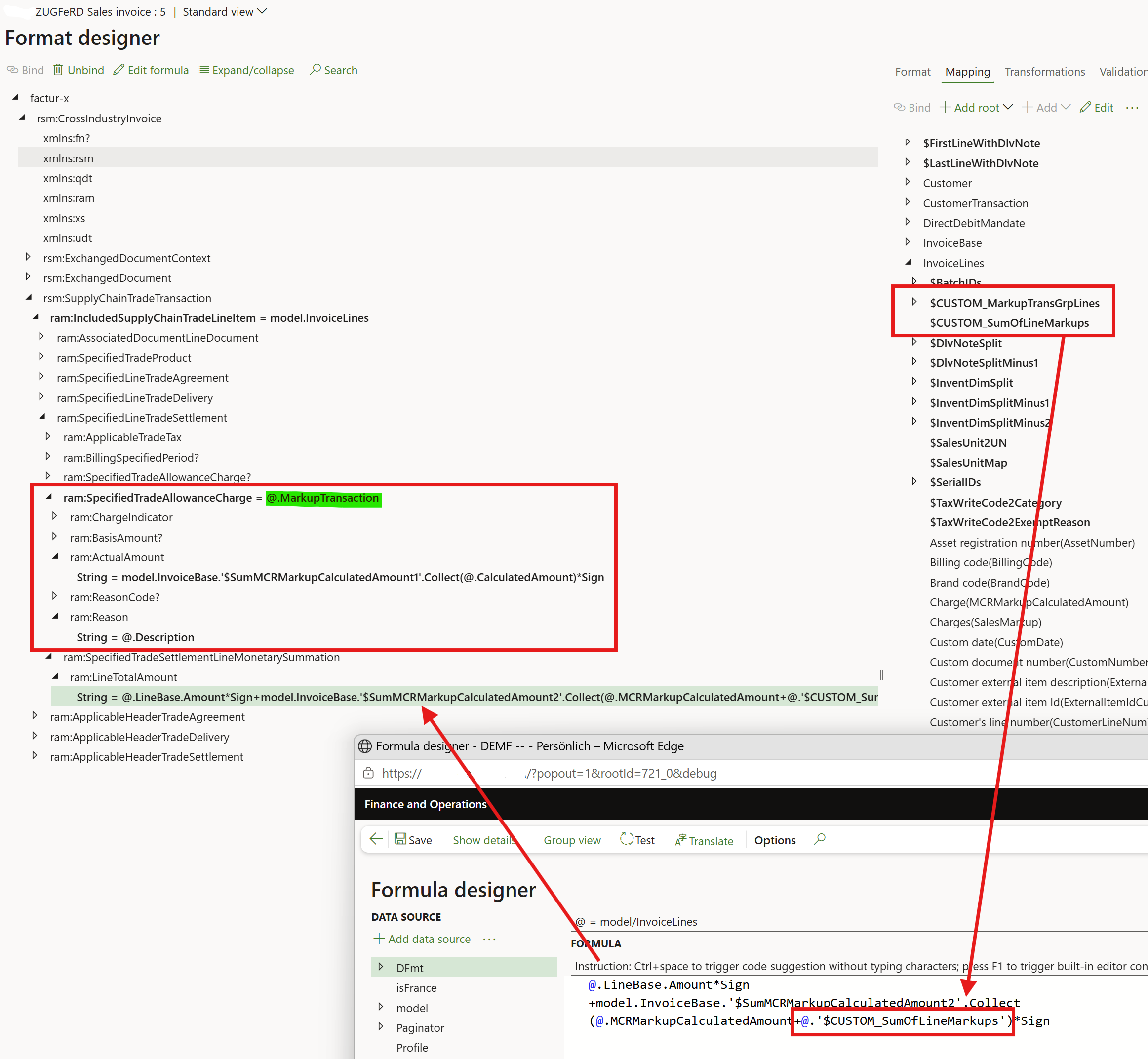
In the derived “ZUGFeRD Sales invoice“, add a new <ram:SpecifiedTradeAllowanceCharge> at the line and bind it  toInvoiceLines.MarkupTransaction as shown below:
This is not all. In accordance with the ZUGFeRD specification, this markup amount is separated from the header level charges, and it increases the total line amount before VAT <ram:LineTotalAmount>. Dynamics 365 in contrary adds all header and line charges and prints them at the and of the invoice. To satisfy the CII scheme, the line charges must be subtracted from the total charge amount given by Dynamics.

In our ZUGFeRD configuration, a collection named $SumMCRMarkupCalculatedAmount2 is used to hold the total of all line charges across all invoice lines. This is why $SumMCRMarkupCalculatedAmount2.Collect() wraps and adds to an internal counter the amounts @.’$CUSTOM_SumOfLineMarkups’, which is a shortcut for the totals of all markup transactions per line: @.’$CUSTOM_SumOfLineMarkups’ = @.’$CUSTOM_MarkupTransGrpLines’.aggregated.SumChargeCalculatedValue
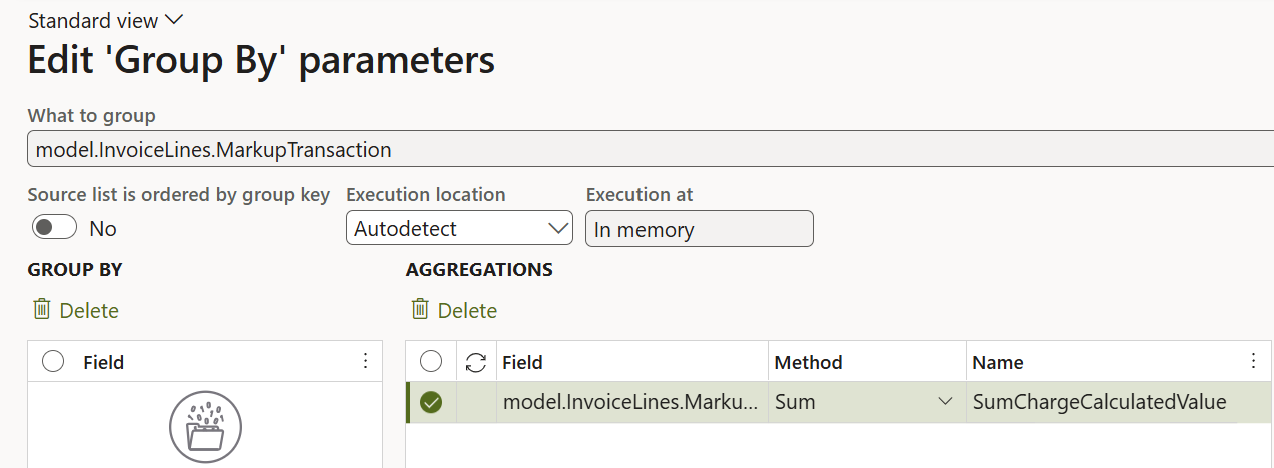

The @.'$CUSTOM_MarkupTransGrpLines' is a Group By element:

Technical debt of customised SSRS Invoices

This chapter concerns Dynamics users who utilised SSRS in the past, or intend to further use their SSRS invoices with the Dynamity Group’s SSRS-to-ZUGFeRD convertor.

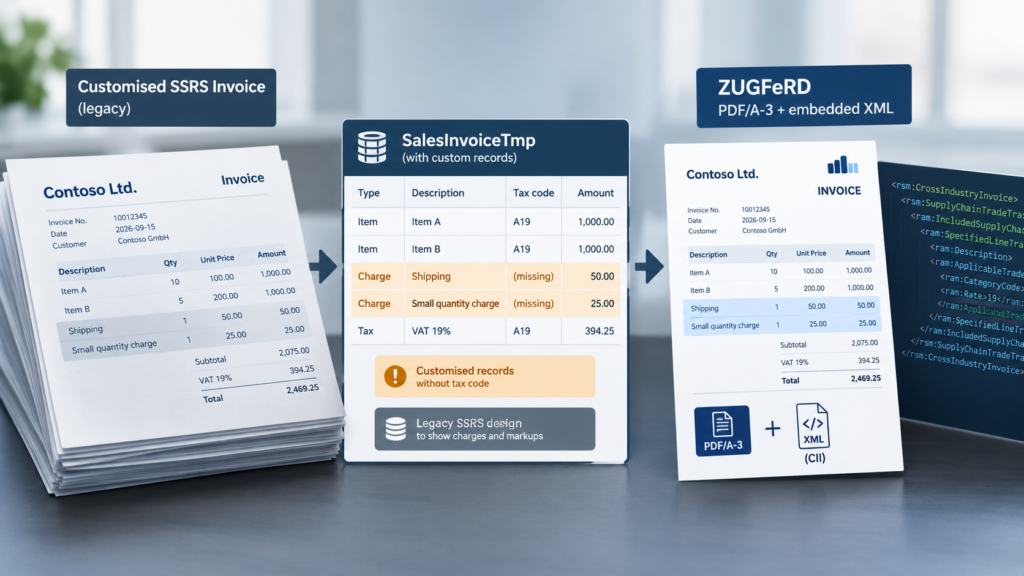
In these installations, we often see the SSRS Report Data Provider (RDP) customised to a certain extent to make the printed invoice show information that the standard invoice layout did not expose conveniently. For example, the abovementioned markup/charge details was a common requirement, there the charges started appearing among the invoice lines and not in a separate section as intended by Microsoft; namely, the typical legacy approach was to inject additional records into SalesInvoiceTmp that behaved like invoice lines from the SSRS report’s perspective. This made it easy for the report designer to render the information in the same repeating line section as normal sales lines. Such customisations could also carry other display-only information that was useful on the printed invoice.

This creates a problem when the same SalesInvoiceTmp dataset is reused as the source for ZUGFeRD/Factur-X:

  • SSRS asks essentially: “What should I display on the printed invoice?”
  • ZUGFeRD/ER asks: “What are the actual commercial invoice lines and their tax/amount semantics?”

With the RDP customised, those are not necessarily the same. Consequently, a record that was perfectly useful as a display-only pseudo-line in an SSRS report can look like a malformed invoice line to CII/ZUGFeRD. It may have an amount or description but lack the quantity, item, tax code or other information expected for a genuine IncludedSupplyChainTradeLineItem.

To resolve this abiguity, the SalesInvoiceTmp data had to be analysed first, the malformed or unintended records identified, and then…

  1. either the upstream/customised D365 logic corrected,
  2. or the rogue SalesInvoiceTmp filtered out so that ZUGFeRD receives a clean dataset,
  3. or the ER binding made more tolerant to these additional records.

The options 2 and 3 are elaborated below on two real-world examples.

Case 2: remove the pseudo-lines from the lines list. In the “Invoice model mapping” there is already a filter of invoice lines to separate true invoice lines from markup records. The latter bear no quantity:

$SalesInvoiceTmp_Lines as WHERE('$SalesInvoiceTmp', '$SalesInvoiceTmp'.Qty <> 0)

This is exactly the place where you can start adding criteria to filter out other pseudo-lines.

Case 3: the developers added records to SalesInvoiceTmp representing order-level surcharges. Unlike the previous cases, we decided not to remove them from SalesInvoiceTmp. They were intended to remain visible in the electronic invoice as IncludedSupplyChainTradeLineItem lines.
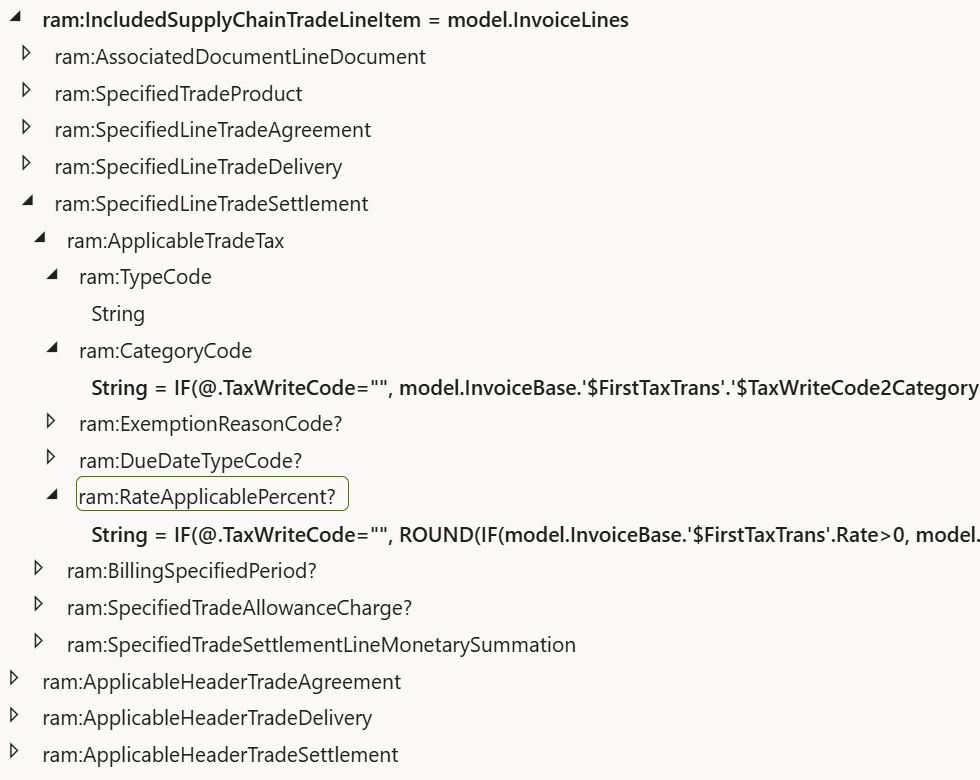
The problem was that these pseudo-lines did not contain the same tax information as regular invoice lines. In particular, the expected TaxWriteCode was not available to the ER data source, resulting in an empty value being passed to the tax-category mapping.

As a solution, where no Print code/tax code was available, the tax category was derived from the first relevant tax transaction, based on the assumption that the invoice contains either zero-rated tax or the applicable standard/reduced German VAT rates, but not a mixture of zero and taxable rates.

A second adjustment was required because the surcharge records were effectively represented twice in the generated XML: once as invoice lines and again as charges. The pseudo-charge lines therefore had to be excluded from the charge calculation so that ChargeTotalAmount remained zero.

Here again, the collection $SumMCRMarkupCalculatedAmount2 was leveraged. When looping through invoice lines and encountering a line representing a charge, the charge amount was recoded to get subtracted at the end. This was achieved with the following dirty trick:
IF(@.TaxWriteCode="",
model.InvoiceBase.’$FirstTaxTrans’.’$TaxWriteCode2Category’&

LEFT(TEXT(model.InvoiceBase.’$SumMCRMarkupCalculatedAmount2′.Collect(@.LineBase.Amount)*0),0),

@.’$TaxWriteCode2Category’)

The amount of the charge has nothing to do with the VAT category, but at that tag the charge amount was evaluated, added to the collection, then reduced to nil with LEFT(TEXT(…),0) = “” .

Extensibility of the Heavy version

To implement a custom invoice design with a corporate logo, a certain colour palette or fonts, extend the ER configuration “ZUGFeRD Sales invoice” as any other configurable business document. Derive an own configuration, then extract, amend and replace the PDF template attached to the ER configuration version.
 

Please bear in mind that PDF forms do not contain dynamic, repeatable ranges or cells (refer to Filling PDF Forms with Electronic Reporting in Dynamics 365 for Finance for more details). This is the reason why the number of invoice lines is limited by the PDF template; change the constants Paginator.#LinesMax, #LinesOnFirstPage and #LinesOnNextPages in accordance with the template to let Dynamics control the number of pages.


The “output actions” i.e. different transmission options are extendable; new output actions may be offered upon request at a discounted price. You may even add your own class ERFileOutputActionXXX_ZUGFeRD. If inherited from the ERFileOutputActionPersist_ZUGFeRD, it will commit the synchronous transmission, setting the SentElectronically flag at the invoice in the process. The interface ERIDocuManagementAttachable_ZUGFeRD interacts with the Archive electronic reporting destination, replacing the file to attach to the ER job record.

The method sendFile() must be implemented. It receives a memory stream with the hybrid invoice and transmits it to the final destination.

The method makeVisitor() must be implemented, too. Its result – a ERFileOutputActionXmlVisitor object – subscribes to the post-processor to extract information from the XML. By default, it receives the file name of the PDF. The input parameter of the method andVisitNode() is the name of a tag in the CII invoice (without the “ram” or “rsm” schema prefix). For example, if instantiated with return visitor.andVisitNode(“ExchangedDocument”), the Visitor object will also receive the invoice number.

				
					/// <summary>
/// Send the resulting PDF to a browser window interactively
/// </summary>
[ERFileOutputAttribute_ZUGFeRD(SRSPrintMediumType::Screen)]
class ERFileOutputActionScreen_ZUGFeRD extends ERFileOutputAction_ZUGFeRD
{
    ERFileOutputActionXmlVisitor_ZUGFeRD visitor;
    /// <summary>
    /// The screen destination does not need to extract any contact info
    /// </summary>
    /// <returns>An empty visitor class</returns>
    public ERFileOutputActionXmlVisitor_ZUGFeRD makeVisitor()
    {
        visitor = new ERFileOutputActionXmlVisitor_ZUGFeRD();
        return visitor;
    }

    /// <summary>
    /// Display  the PDF file formed by ERFileDestinationPostProcessor_ZUGFeRD on the screen 
    /// </summary>
    /// <param name = "_outputPDF">Stream with a PDF file, with a CII XML attached</param>
    /// <returns>Success or failure to display</returns>
    public boolean sendFile(System.IO.MemoryStream _outputPDF)
    {
        Browser br = new Browser();
        
        str downloadUrl = File::SendFileToTempStore(_outputPDF,
                                                    ERConstants_ZUGFeRD::ZUGFeRD_Filename,
                                                    classstr(FileUploadTemporaryStorageStrategy),
                                                    true);
        if (downloadUrl != '')
        {
            br.navigate(downloadUrl, true, false);
        }
        else
        {
            return checkFailed("@ApplicationPlatform:DownloadFailed");
        }
        return true;
    }

}