Deferred revenue in foreign currency: closing the gap in D365

Deferred revenue in foreign currency: closing the gap in D365

The gap

In Microsoft Dynamics 365 for Finance, Deferred revenue in Subscription Billing works reliably as long as you stay within a single currency context. Once foreign currencies are involved, a design flaw starts to show its effects: the system recognises deferred revenue exclusively in accounting currency. The original transaction currency is disregarded, and the exchange rate used at invoice posting is not retained in the deferral logic.

This is consistent behaviour Revenue <-> COGS, but it creates a persistent issue: accounts stop balancing in currency, and this is even carried forward from year to year, at every FY closing.
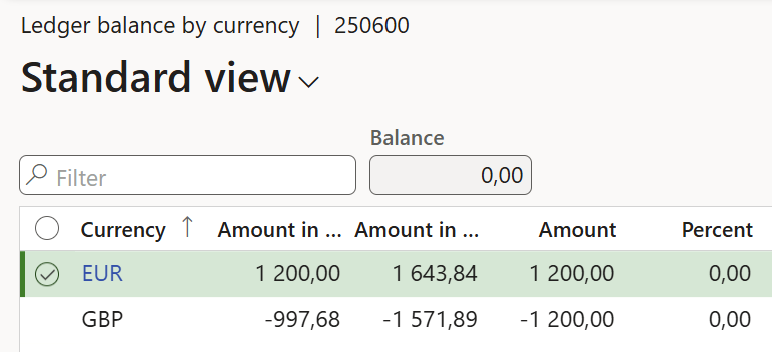
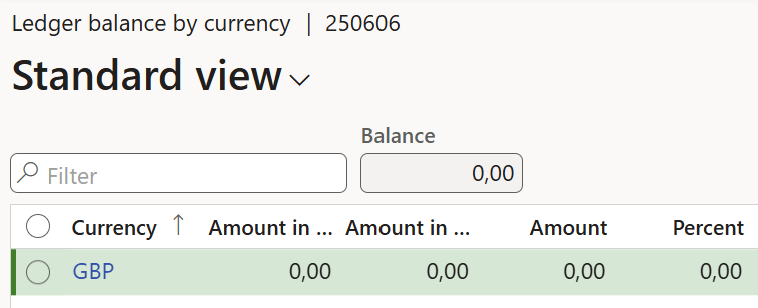
At invoice posting, the exchange rate is effectively fixed, and from there, the deferral engine operates purely in accounting currency. This becomes visible when the deferred balance is fully recognised. In accounting currency, the balance reaches zero as expected. In transaction currency, however, it does not. Residual amounts remain not because of revaluation or fluctuating exchange rates, but because the postings were never aligned in the first place.

From a reconciliation point of view, this is difficult to justify. An account that is technically cleared still shows values in another currency view.

It is worth noting that this behaviour has been raised repeatedly: many customers and partners complained, the “Idea” Deferral schedule recognition to include transaction currency is at the top of complaints about the Subscription billing module.

Customisation: store the historical exchange rate, fix the recognition journal

Rather than working around the issue, the approach taken here was more straightforward: the Subscription Billing deferral logic was adjusted so that revenue recognition is posted in the original transaction currency, using the exchange rate from the invoice; in other words, the system was made to behave as one would expect.

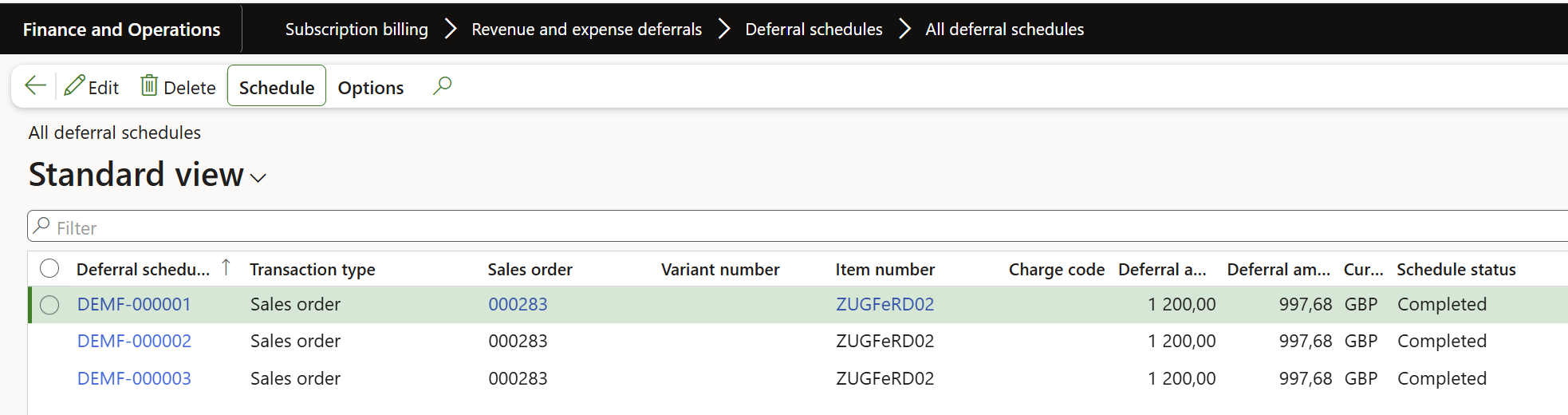
Technically, this requires intervening in the deferral posting process. First, we add 3 fields – currency, amount, and rate to the Deferrals schedule table, and populate them:

				
					[ExtensionOf(classStr(SubBillDeferralScheduleCreate))]
final class SubBillDeferralScheduleCreate_Extension
{
    public static void initDeferralScheduleTable(
        SubBillDeferralAmountSource _subBillDeferralAmountSource,
        SubBillDeferralTransactionLineDeferral _deferralTable,
        SubBillDeferralScheduleTable _schedTable,
        boolean _usingShortTerm)
    {
        next initDeferralScheduleTable(_subBillDeferralAmountSource, _deferralTable, _schedTable, _usingShortTerm);
        if (_subBillDeferralAmountSource == SubBillDeferralAmountSource::DeferralAmount)
        {
            _schedTable.SubBillDeferralAmountCur = _deferralTable.SubBillDeferralAmountCur;
            _schedTable.ExchRate = _deferralTable.ExchRate;
            _schedTable.CurrencyCode = _deferralTable.CurrencyCode;
        }
    }
}


The form Subscription billing > Revenue and expense deferrals > Deferral schedules > All deferral schedules has been extended to reflect the new fields, too: 
Next, we make sure that the 3 values are carried through correctly as the invoice is posted and the final schedule lines are re-initialised from the posted invoice line:

				
					[ExtensionOf(tableStr(SubBillDeferralTransactionLineDeferral))]
final class SubBillDeferralTransactionLineDeferral_Extension
{
    public void updateFromTransaction()
    {
        next updateFromTransaction();

        if (! this.TransRecId)
        {
            return;
        }
        switch (this.SubBillDeferralSourceRecType)
        {
            case SubBillDeferralSourceRecType::SalesLine:
                if (this.SubBillDeferralTransactionType != SubBillDeferralTransactionType::SalesOrder)
                {
                    // Not supported
                    return;
                }
                SalesLine salesLine = SalesLine::findRecId(this.TransRecId);
                this.SubBillDeferralAmountCur = salesLine.calcGrossAmountExclTax(this.Qty);
                SalesFixedExchRate fixedExchRate = salesLine.salesTable().fixedExchRate();
                if (fixedExchRate != 0.0)
                {
                    this.ExchRate = fixedExchRate;
                }
                else
                {
                    ExchangeRateHelper helper = ExchangeRateHelper::construct();
                    helper.parmFromCurrency(salesLine.CurrencyCode);
                    helper.parmExchangeDate(this.TransDate);
                    helper.parmToCurrency(Ledger::accountingCurrency());
                    this.ExchRate = helper.getExchangeRate1();
                }
                this.CurrencyCode = salesLine.CurrencyCode;
                break;

            case SubBillDeferralSourceRecType::CustInvoiceTrans:
                CustInvoiceTrans custInvoiceTrans = CustInvoiceTrans::findRecId(this.TransRecId);
                this.SubBillDeferralAmountCur = custInvoiceTrans.LineAmount + custInvoiceTrans.SumLineDisc;
                this.ExchRate = custInvoiceTrans.exchRate();
                this.CurrencyCode = custInvoiceTrans.CurrencyCode;
                break;

            default:
                return;
        }

        this.SubBillDeferralAmountCur = abs(this.SubBillDeferralAmountCur);
    }
}


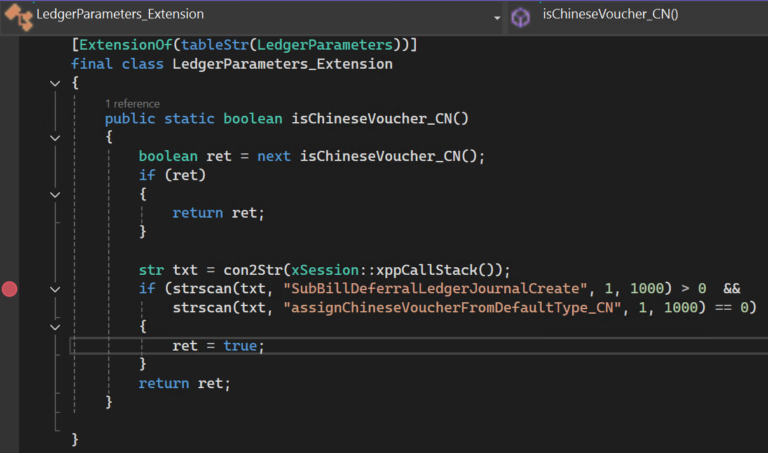
At last, these stored rates are used in the monthly revenue recognition (do not Summarise the journal lines!). This is the hardest part, because the class SubBillDeferralLedgerJournalCreate  is nearly impossible to extend in the D365 FO standard, as the developers either “privatised” or “internalised” all methods for no obvious reason. All.. but one. I’ll leave this adventurous Chinese hack uncommented:

				
					[ExtensionOf(tableStr(LedgerParameters))]
final class LedgerParameters_Extension
{
    public static boolean isChineseVoucher_CN()
    {
        boolean ret = next isChineseVoucher_CN();
        if (ret)
        {
            return ret;
        }

        str txt = con2Str(xSession::xppCallStack());
        if (strscan(txt, "SubBillDeferralLedgerJournalCreate", 1, 1000) > 0  &&
            strscan(txt, "assignChineseVoucherFromDefaultType_CN", 1, 1000) == 0)
        {
            ret = true;
        }
        return ret;
    }

}


The hack then ultimately triggers the actual update of the general journal line with the proper amount and rate:

				
					[ExtensionOf(classStr(SubBillDeferralLedgerJournalCreate))]
final class SubBillDeferralLedgerJournalCreate_Extension
{
    protected void assignChineseVoucherFromDefaultType_CN(LedgerJournalTrans _ledgerJournalTrans)
    {
        next assignChineseVoucherFromDefaultType_CN(_ledgerJournalTrans);

        SubBillDeferralScheduleNumber   schedNumber = subStr(_ledgerJournalTrans.Txt, 1, strFind(_ledgerJournalTrans.Txt, " ", 1, 20)-1);
        if (! schedNumber)
        {
            return;
        }
        SubBillDeferralScheduleTable deferralScheduleTable;
        deferralScheduleTable = SubBillDeferralScheduleTable::find(schedNumber);
        if (! schedNumber)
        {
            return;
        }
        if (deferralScheduleTable.ExchRate == 0.00 || deferralScheduleTable.ExchRate == 100.00)
        {
            return;
        }

        _ledgerJournalTrans.CurrencyCode = deferralScheduleTable.CurrencyCode;

        if (_ledgerJournalTrans.AmountCurDebit)
        {
            _ledgerJournalTrans.AmountCurDebit = CurrencyExchangeHelper::curAmount(
                _ledgerJournalTrans.AmountCurDebit,
                deferralScheduleTable.CurrencyCode,
                deferralScheduleTable.TransDate,
                UnknownNoYes::Unknown,
                deferralScheduleTable.ExchRate);
        }
        else
        {
            _ledgerJournalTrans.AmountCurCredit = CurrencyExchangeHelper::curAmount(
                _ledgerJournalTrans.AmountCurCredit,
                deferralScheduleTable.CurrencyCode,
                deferralScheduleTable.TransDate,
                UnknownNoYes::Unknown,
                deferralScheduleTable.ExchRate);
        }
        _ledgerJournalTrans.ExchRate = deferralScheduleTable.ExchRate;
    }
}


The result

…is simple: balances clear cleanly not only in accounting currency, but also in transaction currency. There are no residual amounts, no inconsistencies, and no need for explanations during reconciliation. A long-standing and widely discussed gap is effectively closed.

You may download the source code here: SubBillDeferral_with2currencies
Manipulate PDF files in Dynamics 365 with iText

Manipulate PDF files in Dynamics 365 with iText

When making archivable invoices in Dynamics 365 Finance & Supply Chain Management, PDF handling may be a topic: we must ensure PDF/A-3 compliance, and guarantee that invoices remain readable for customers and auditors. In this series, I will show you how to manipulate PDFs directly from X++ using the iText 7 for .NET library.

The iText is a popular open-source library for creating and manipulating PDF files programmatically. It offers support for advanced use cases such as: converting HTML to PDF, filling interactive PDF forms, embedding attachments, converting to PDF/A (archival standards). This makes iText a versatile tool when extending Electronic Reporting (ER) or custom document generation in Dynamics 365 FO.

At first glance, you might be tempted to take the latest version of iText. Unfortunately, in Dynamics 365 FO, that’s not possible. From version 8 onwards, iText introduced a breaking change; it requires one of two mutually exclusive cryptography connectors: BouncyCastle Adapter or BouncyCastle FIPS Adapter. In a normal .NET Core or Java application, you could choose one. But in Dynamics 365 FO, we are bound by the AOS linking rules: both cannot coexist, and we cannot configure mutually exclusive linking at runtime. That’s why we stick to iText 7 for .NET, the last major version without this restriction.

DLL libraries

Library Purpose NuGet / Download
itext.commons Common utilities, required by all modules commons.nuget 7.2.6
itext.kernel Core PDF document model itext7.nuget 7.26
itext.io Low-level PDF parsing and writing, required by kernel
itext.forms AcroForms support (reading/writing fields)
itext.layout High-level layout, form value appearances
BouncyCastle.Crypto Cryptography provider, required by kernel Portable.BouncyCastle 1.9.0

Put these into the bin folder of the model, then add these to your project -> References, browsing and picking them from the folder.

PdfDocument initialisation and “Stamping” 

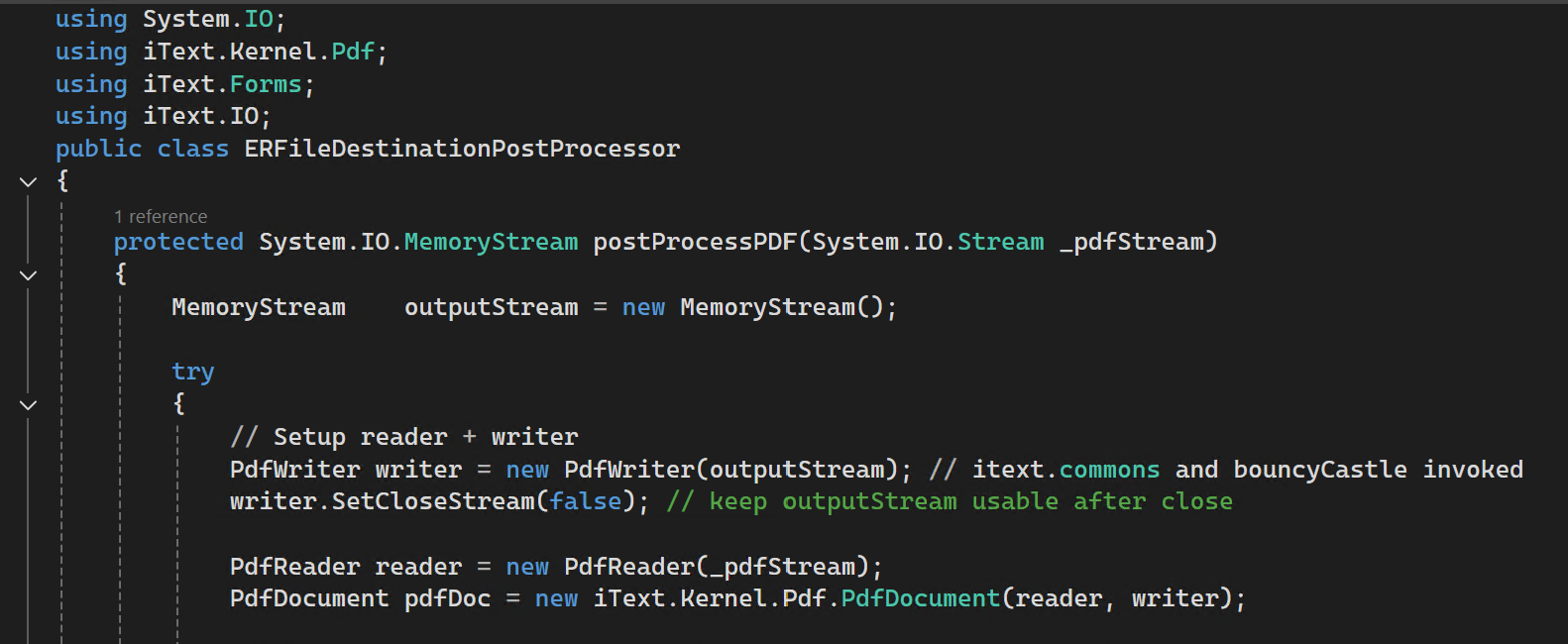
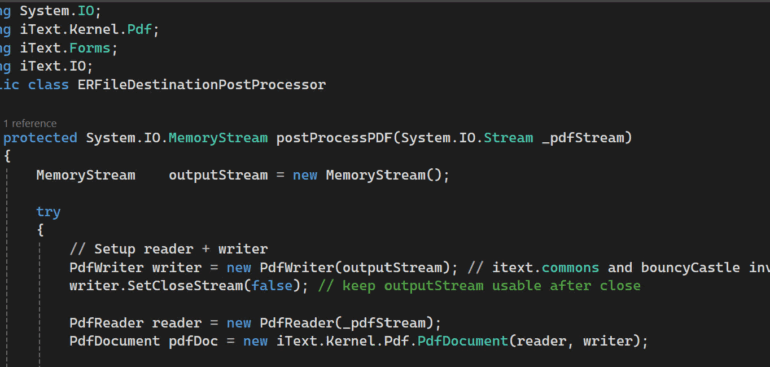
Here’s a real-world method implemented in Dynamics 365 FO. It takes an existing PDF, flattens all form fields (so values from XFDF imports remain visible), and returns a memory stream you can pass further to the archive as an attachment.

Stamping mode means that you take an existing PDF, open it for reading, and at the same time prepare a writer to save changes into a new file or stream. In iText this is controlled by the constructor of PdfDocument. If you pass only a PdfWriter, you start with a blank PDF and stamping is not possible. If you pass only a PdfReader, you can read the document but you cannot modify it. If you pass both a PdfReader and a PdfWriter, the document is opened in stamping mode. That is the case in the below Dynamics 365 example.

				
					using iText.Kernel.Pdf;
public class ERFileDestinationPostProcessor
{
    protected System.IO.MemoryStream postProcessPDF(System.IO.Stream _pdfStream)
    {
        System.IO.MemoryStream outputStream = new System.IO.MemoryStream();
        try
        {
            // Setup reader + writer
            PdfWriter writer = new PdfWriter(outputStream); // itext.commons and bouncyCastle invoked
            writer.SetCloseStream(false); // keep outputStream usable after close
            PdfReader reader = new PdfReader(_pdfStream);

            PdfDocument pdfDoc = new PdfDocument(reader, writer);

            // Flatten AcroForm fields so values remain visible (XFDF values preserved)
            iText.Forms.PdfAcroForm form = iText.Forms.PdfAcroForm::GetAcroForm(pdfDoc, true);
            if (form != null)
            {
                form.SetGenerateAppearance(true);            
                var Fields = form.GetFormFields();
                if (Fields.Count > 0) // Touch every field to generate appearence
                {
                    var Enumerator = Fields.GetEnumerator();
                    while (Enumerator.MoveNext())
                    {
                        var KeyValuePair = Enumerator.get_Current();
                        var Field = KeyValuePair.get_Value();
                        str value = Field.GetValueAsString();

                        if (value)
                        {
                            // Set the value to itself, Force regenerate appearance
                            Field.SetValue(value); // itext.layout is leveraged here
                        }
                    }
                }
                form.SetNeedAppearances(false); // PDF/A requirement: NeedAppearances must be false or absent
                form.FlattenFields();
            }            
            pdfDoc.Close();
            reader.Close();
            writer.Flush();
        }
        catch (Exception::CLRError)
        {
            System.Exception exception = CLRInterop::getLastException();
            if (exception != null)
            {
                warning(exception.get_InnerException() ? exception.get_InnerException().get_Message() : exception.get_Message());
            }
        }
        return outputStream;
    }
}


This flattening is important because it guarantees that all the values filled into the PDF form remain permanently visible and readable even if the file is opened outside of Adobe Reader. To meet PDF/A compliance rules, the NeedAppearances flag must be set to false, so viewers do not depend on dynamic rendering of the fields. By assigning each field’s value back to itself, the code forces iText to regenerate the visual appearance; otherwise, the .FlattenFields() call is going to wipe all form data from the document.

Embedding an ICC profile 

A PDF/A document must declare its output intent. The output intent tells a PDF viewer how colours should be interpreted, and this is done by embedding an ICC profile. For most business documents, the standard profile is sRGB IEC61966-2.1, which defines an RGB color space suitable for PDFs primarily displayed on the screen. You may download it here: https://www.color.org/srgbprofiles.xalter. Without a profile, the PDF is not going not pass validation for PDF/A.

In Dynamics 365 we cannot rely on a file path, so the ICC profile is added as an embedded resource (AOT/Resources). At runtime the code checks whether the PDF already contains an output intent, then loads the profile from the resources and attaches it to the document. There should not be more than 1 profile in the document:

				
					            // Check if there is already an ICC profile embedded
            PdfDictionary catalog = pdfDoc.GetCatalog().GetPdfObject();
            PdfArray outputIntents = catalog.GetAsArray(new PdfName("OutputIntents"));
            if (outputIntents == null || outputIntents.Size() == 0)
            {
                // Load sRGB Preference ICC profile from the embedded resource
                ResourceNode iccResourceNode = SysResource::getResourceNode(resourceStr(sRGB_v4_ICC_preference));
                container iccInContainer = SysResource::getResourceNodeData(iccResourceNode);

                System.IO.Stream iccStream = Binary::constructFromContainer(iccInContainer).getMemoryStream();
                if (iccStream)
                {
                    // Add output intent (required by PDF/A)
                    PdfOutputIntent outputIntent = new PdfOutputIntent(
                        'Custom',
                        "", // outputCondition
                        'http://www.color.org',
                        'sRGB IEC61966-2.1',
                        iccStream);
                    pdfDoc.AddOutputIntent(outputIntent);
                }
                else
                {
                    warning("ICC profile is not found in D365...");
                }
            }


Replacing the PDF before archiving

Microsoft provides the ERDocuManagementEvents class and event handlers that allow you to intercept how Electronic Reporting saves files in Organisation administration > Electronic reporting > Electronic reporting jobs, see https://learn.microsoft.com/en-us/dynamics365/fin-ops-core/dev-itpro/analytics/er-custom-storage-generated-documents.

The following event handler subscribes to the point where ER is about to save the file. We check if the file is a PDF we wish to intercept, and if so, we run our own post-processing logic before handing the stream back to ER. If the “handled” state is sent back to ER with  fileEventArgs.markAsHandled(), then the archive receives the replaced file.

				
					using Microsoft.Dynamics365.LocalizationFramework;
/// <summary>
/// This is the main trigger for the PDF post-processing
/// </summary>
class ERDocuSubscriptionCopy
{
    /// <summary>
    /// Capture an attempt by ER to save an attachment, react to a DocuTypeId with a magic pattern in the name
    /// </summary>
    /// <param name = "_args">Attachment context</param>
    [SubscribesTo(classStr(ERDocuManagementEvents), staticDelegateStr(ERDocuManagementEvents, attachingFile))]
    public static void ERDocuManagementEvents_attachingFile(ERDocuManagementAttachingFileEventArgs _args)
    {
        ERDocuManagementAttachingFileEventArgs fileEventArgs = _args;
        if (fileEventArgs.isHandled())
        {
            return;
        }
        if (! strContains(fileEventArgs.getDocuTypeId(), "MyDocuType"))
        {
            return;
        }

        var inputStream = fileEventArgs.getStream();
        // Rewind
        if (inputStream.CanSeek)
        {
            inputStream.Seek(0, System.IO.SeekOrigin::Begin);
        }

        ERFileDestinationPostProcessor postProcessor = new ERFileDestinationPostProcessor();
        System.IO.MemoryStream outputStream = postProcessor.postProcessPDF(inputStream);

        // Do something with the  PDF
        if (outputStream != null)
        {
            boolean attachmentHandled;            
            try
            {
                DocuRef     docuRef;
                docuRef = this.createDocuRef(outputStream,
                                         fileEventArgs.getOwner().TableId,
                                         fileEventArgs.getOwner().RecId,
                                         fileEventArgs.getOwner().DataAreaId);
                if (docuRef)
                {
                    fileEventArgs.setDocuRef(docuRef);
                    attachmentHandled = true;
                }
            }
            finally
            {
                attachmentHandled = false;
            }

            if (attachmentHandled)
            {
                fileEventArgs.markAsHandled();
            }
        }
    }
}